50 Sandwich Procreate Stamps Brush
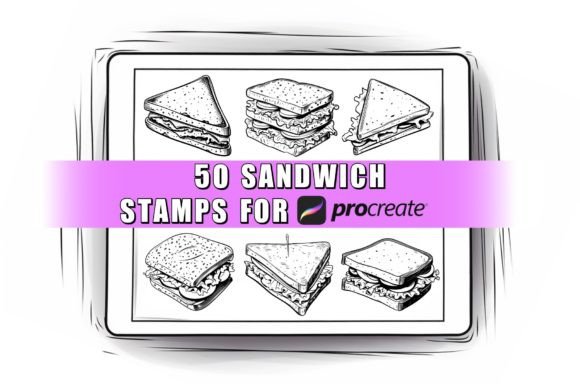
Adding delicious details to your digital art doesn't have to be time-consuming. With the 50 Sandwich Procreate Stamps Brush, you can instantly incorporate a wide variety of appetizing sandwich designs into your creative projects. This specialized tool is designed for artists, designers, and hobbyists who use the Procreate app on their Apple iPad. Instead of spending hours drawing every crust, filling, and leaf from scratch, you simply tap the canvas to place a high-quality stamp. It is an efficient solution for anyone looking to enhance food-themed illustrations, menu designs, or lifestyle content with professional-looking results.
What Is Inside the Stamp Set?
This collection is more than just a single brush; it is a comprehensive library containing 50 unique sandwich varieties. Each stamp represents a different design, ranging from classic club sandwiches and gourmet wraps to colorful veggie subs and hearty burgers. The set acts as a visual toolkit, giving you immediate access to diverse food imagery without needing advanced drawing skills.
The primary value of this set lies in its versatility. Whether you are creating a children's book about healthy eating, designing a flyer for a local cafe, or building a mood board for a restaurant renovation, these stamps provide the perfect finishing touch. Because each design is distinct, you avoid the repetitive look that often plagues projects relying on a single image source. You get a full spectrum of culinary styles ready to be integrated into your workflow.
Designed Exclusively for Procreate Users
It is important to understand the technical environment where these tools shine. The 50 Sandwich Procreate Stamps Brush is built specifically for the Procreate application, which is available only on Apple iPad devices. This exclusivity ensures that the brushes function exactly as intended within the app's robust engine.
If you are using other graphic design software like Photoshop, Illustrator, or apps on Android tablets, please note that this file will not work. The brush data is formatted specifically for Procreate's architecture. However, once imported into the app, the experience is seamless. You do not need a specific type of stylus to use them. While many artists prefer the precision of an Apple Pencil, these stamps are not pressure-sensitive. This means you can use a third-party stylus, a basic capacitive pen, or even your finger to apply the designs. This flexibility makes the set accessible to beginners who might not yet own expensive accessories.
Customization and Creative Control
One of the biggest misconceptions about stamp brushes is that they are rigid and unchangeable. In reality, the 50 Sandwich Procreate Stamps Brush offers significant room for customization. Once you select a stamp, you retain full control over its appearance. You can easily adjust the size to fit your composition, whether you need a tiny detail in the background or a large hero image for a poster.
Color is another area where creativity takes the lead. Although the stamps come with default colors, you can change the hue to match your project's palette. Want a blue cheese sandwich for a surreal illustration? Or perhaps a neon-colored wrap for a pop-art piece? You can modify the color directly within the brush settings. Additionally, you can tweak the opacity to create faded backgrounds, watercolor effects, or subtle textures. This adaptability ensures that the stamps blend naturally into your artwork rather than looking like pasted-on stickers.
Practical Uses for Personal and Commercial Projects
The applications for this brush set are vast, catering to both casual creators and professional entrepreneurs. For small business owners, such as those running a bakery or a sandwich shop, these stamps are invaluable for marketing materials. You can quickly draft social media posts, email newsletters, or promotional flyers featuring mouth-watering visuals without hiring a photographer or illustrator.
Educators and content creators also find great utility in these tools. Teachers making digital worksheets about nutrition can use the stamps to make lessons engaging. Bloggers writing about recipes or kitchen trends can illustrate their articles with custom graphics that stand out from generic stock photos. Even freelancers working on branding projects can use these elements to add a playful, human touch to logos or website headers.
Because the license allows for both personal and commercial use, you have the freedom to monetize your creations. You can sell prints, merchandise, or digital assets that feature these designs, provided you adhere to the usage guidelines. This makes the investment highly valuable for anyone looking to expand their creative portfolio while saving time on asset creation.
Important Considerations Before Downloading
Before purchasing, there are a few critical details to keep in mind to ensure this product meets your needs. First and foremost, this is a digital download only. You will not receive any physical items, printed cards, or packaging. Upon purchase, you will receive a single brush set file that contains all 50 stamps. You must import this file into your Procreate app to begin using it.
Since digital files cannot be returned, refunds are generally not available once the download link has been accessed. It is essential to verify that you have an Apple iPad and the latest version of the Procreate app before buying. Furthermore, remember that screen technology varies. The colors you see on your monitor may differ slightly from how they appear on other devices or in print. Always review the preview images carefully to ensure the style matches your vision.
Licensing and Ethical Usage
Respecting intellectual property is a key part of being a professional creator. When you acquire the 50 Sandwich Procreate Stamps Brush, you are granted a license to use the designs for your own projects. This includes personal hobbies and commercial ventures. However, there are clear boundaries regarding distribution.
You are strictly prohibited from reselling, sharing, trading, or giving away the original brush files. These assets cannot be claimed as your own creation, nor can they be redistributed as a separate product. The goal is to empower you to create new works, not to replicate the source material itself. By adhering to these terms, you support the artist and ensure that the community continues to produce high-quality resources for everyone.
Getting Started with Your New Brushes
Once you have downloaded the file, the process of importing it into Procreate is straightforward. Simply open the app, navigate to the brush library, and follow the standard import procedure for brush sets. Within moments, you will have access to 50 fresh designs ready to transform your canvas. Experiment with layering different stamps, adjusting blending modes, and combining them with hand-drawn elements to create truly unique compositions.
Whether you are a seasoned digital artist or just starting your journey on the iPad, having a dedicated set of food stamps can significantly boost your productivity and creativity. The 50 Sandwich Procreate Stamps Brush removes the barrier of complex drawing techniques, allowing you to focus on composition, storytelling, and design. Dive in, explore the variety, and let your appetite for creativity guide your next masterpiece.